GPU Particles
Overview
Configures settings related to GPU particles. When enabled on a node, that node works as an emitter and spawns GPU particles.
Unlike regular particles, which are simulated on the CPU, GPU particles are simulated on the GPU. This allows much larger particle counts to be handled efficiently.
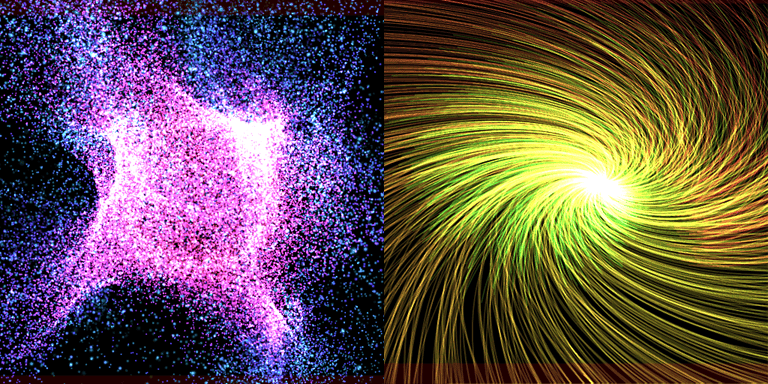
GPU particles are available only on modern graphics APIs.
| Target | Support | Notes |
|---|---|---|
| DirectX 9 | ❌ | |
| DirectX 11 | ✅ | Shader Model 5.0 or later |
| DirectX 12 | ✅ | |
| OpenGL | ❌ | |
| Vulkan | ✅ | |
| Metal | ✅ | |
| WebGL | ❌ |
| Target | Support | Notes |
|---|---|---|
| Unity | ❌ | Supported in the future |
| Unreal Engine | ❌ | Supported in the future |
| Godot Engine | ❌ | Supported in the future |
Parameters
Because GPU particles are simulated on the GPU, the available functionality is more limited than with regular particles.
Enabled
Enable GPU particles if checked.
Basic
Basic settings for GPU particle spawning.
When GPU particles start, memory is allocated from the particle buffer according to Spawn Amount x Time to live.
Spawn count
The total number of particles to spawn. Spawning stops when this count is reached.
If Infinity is enabled, it will keep spawning particles indefinitely.
It will stop spawning particles when the parent particle is destroyed or when an external request to stop is made.
Spawn Amount
The number of particles spawned per frame. Increase this value to make the particles denser.
Initial Delay
The delay before particle emission starts.
Time to live
The lifetime of each particle. This also affects how quickly various parameters change.
Emission
Sets the shape of the particle emission source. The final shape is affected by the parent particle's transform (position, rotation, and scale).
Emission Shape
Sets the type of emitter shape.
Supports Point, Line, Circle, Sphere, and Model.
| Point shape | Line shape | Circle shape | Sphere shape | Model shape |
|---|---|---|---|---|
 |
 |
 |
 |
 |
Parameters for Point shape
There are no additional parameters for point shapes.
Parameters for Line shape
Particles are spawned from the line segment between Start Point and End Point.
Increasing Line Thickness gives the shape a cone-like spread.
Parameters for Circle shape
Particles are spawned from a circle whose central axis is Circle Axis.
The radius is determined by Inner Radius and Outer Radius.
Parameters for Sphere shapes
Particles are spawned from the surface of a sphere defined by Sphere Radius.
parameters for Model shape
For model shapes, particles are spawned from the surface of the specified model mesh.
You can also specify Size separately.
Position
Sets particle position and movement.
Particle positions are also affected by Force in addition to the values set here.
Direction
The movement direction vector used when particles are spawned.
Spread
The angle to randomly spread particles in the direction of movement when spawning particles. The range is from 0 to 180 degrees; 0 degrees has no randomness, 90 degrees diffuses in a hemispherical shape, and 180 degrees diffuses in all directions.
Initial Speed
The speed at which particles are spawned. This affects the initial velocity. A random range can be set.
Damping
Damping applied during particle motion. Increasing this value makes particles slow down as they move. A random range can be set.
Rotation
Sets particle orientation and rotation.
The visual result depends on the billboard settings of the drawing shape.
Fixed mainly uses the XYZ parameters, while Z-axis rotation billboards mainly use the Z parameters.
Initial Angle
The angle (Euler) at spawn time. A random range can be set.
Angular Velocity
The rotation speed (Euler) applied over time. A random range can be set.
Scale
Sets the particle size. Behavior changes depending on the selected mode.
In
Fixedmode, the scale stays at the specified value.In
Easingmode, the scale changes smoothly from the start value to the end value over the particle lifetime.
Single Scale
Fixed scale, independent of the axis. A random range can be set.
XYZ Scale
Fixed scale for each of the XYZ axes. A random range can be set.
Start and End (Single)
The start and end scale for axis-independent easing. A random range can be set.
Start and End (XYZ)
Scale of the start and end points of easing applied to each of the XYZ axes. A random range can be set.
Force
Configures forces applied externally to particles.
| Gravity | Vortex | Turbulence |
|---|---|---|
 |
 |
 |
Gravity
Applies acceleration in the specified direction. It does not have to point downward, and it is not affected by the parent particle's orientation.
Vortex
Applies a rotating force around the specified Center Point and Axis.
You can adjust the strength of this motion using Rotational Force and Attraction Force.
Turbulence
Applies noisy motion using a vector field generated from Random Seed, Field Scale, and Complexity.
You can adjust the strength of the turbulence using Power.
Rendering
General settings for rendering particles.
Blend
Blending settings when drawing.
Depth Write
Turn ON to write depth.
Depth Test
Turn ON to perform depth test.
Shape
Sets the shape of particles when they are drawn.
Shape
Select a shape from the following three types.
| Shape Type | Description |
|---|---|
| Sprite | Draws simple quads. |
| Model | Draws user models. |
| Trail | Draws line connecting the locations of the trajectory along which the particles is moving. |
Billboard
Specify how the sprite is placed in relation to the particle.
| Billboard Type | Description |
|---|---|
| Rotated Billboard | Sprite rotates along the Z-axis while facing the viewpoint. |
| Directional Billboard | Sprite faces the camera while rotating so that its Y+ direction points along the direction of movement. |
| Fixed Y-Axis | Sprite faces viewpoint side while fixed to Y-axis. |
| Fixed | Sprite orientation follows particle rotation. |
Model
Specifies the user model to draw.
Trail Length
Specifies the length of the trajectory. Increasing this value increases the trajectory length and also the memory allocated from the trail buffer.
Shape Size
Specifies the base size of the rendered shape. This is multiplied by the Scale parameter. If the shape is a trail, it affects the thickness.
Color
Sets parameters for particle color.
Color inheritance
When enabled, the particle is affected by the color of its parent particle.
Color All
Sets the particle's color.
| Color Type | Description |
|---|---|
| Fixed | Sets a fixed color that does not change. |
| Random | Sets two colors that are randomly determined during particle spawn. |
| Easing | Sets the color of the starting point and the end point. The color changes over the particle's lifetime. |
| F-curve | Sets the F-curve depicting the RGBA change. |
| Gradient | Sets the gradient depicting a RGBA change. |
Emissive Scaling
Multiplier applied to particle brightness.
This value is multiplied by the RGB of Color All.
Fade-In
Makes particles fade in when they appear.
Fade-Out
Makes particles fade out when they disappear.
Material
Sets the material used to draw particles.
Material Type
| Type | Description |
|---|---|
| Unlit | Displays particle colors directly, without lighting |
| Lighting | Shaded by the light source |
Color Texture
Specifies the color texture used for rendering particles.
Normal Texture
Available when the material type is Lighting.
Specifies the normal texture used to render particles.